1
Create your account
Go to https://app.bridgelabs.tech/auth/role-selection and sign up. Select your organization typorganization type so Bridge Labs can tailor the experience to how you will use it: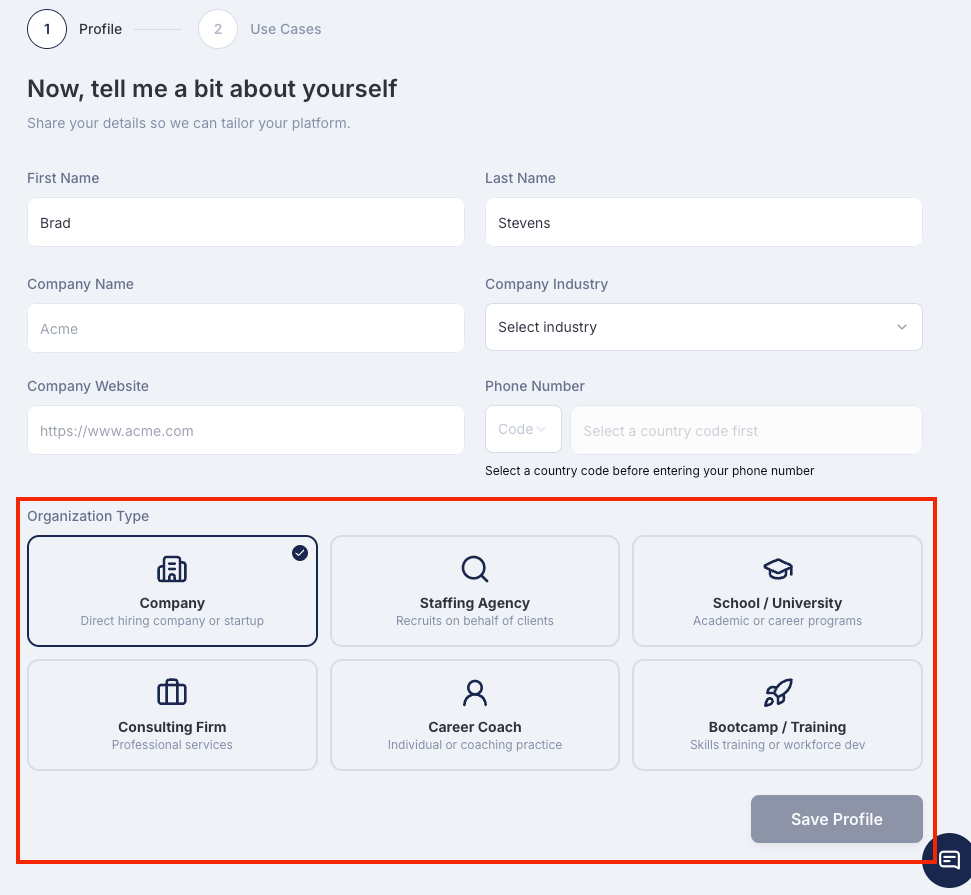
- Company — Direct hiring companies and startups use Bridge Labs to screen candidates at scale. Set up structured async video interviews for any open role and review AI-scored results in your dashboardCompany — Direct hiring companies and startups use Bridge Labs to screen candidates at scale. Set up structured async video interviews for any open role and review AI-scored results in your dashboard.
- Staffing agency: create shareable candidate profiles for client placements.
- Staffing Agency — Agencies that recruit on behalf of clients use Bridge Labs to build shareable candidate video profiles, differentiate their shortlists, and move faster than the competitionStaffing Agency — Agencies that recruit on behalf of clients use Bridge Labs to build shareable candidate video profiles, differentiate their shortlists, and move faster than the competition.
- School / University — Academic institutions and career programs use Bridge Labs to run interview preparation sessions for students at cohort scale, with objective AI feedback on every response/ University — Academic institutions and career programs use Bridge Labs to run interview preparation sessions for students at cohort scale, with objective AI feedback on every response.
- Consulting Firm — Professional services firms use Bridge Labs to screen and evaluate candidates for client engagements with a structured, consistent procesConsulting Firm — Professional services firms use Bridge Labs to screen and evaluate candidates for client engagements with a structured, consistent process.
- Career Coach — Independent coaches and coaching practices use Bridge Labs to run structured mock interview sessions for clients, delivering objective AI scoring alongside their own expert feedback.
- Bootcamp / Training — Skills training programs and workforce development organizations use Bridge Labs to prepare graduates for real interviews with role-specific questions and AI-powered feedback before they hit the job market.
- Career Coach — Independent coaches and coaching practices use Bridge Labs to run structured mock interview sessions for clients, delivering objective AI scoring alongside their own expert feedback.
- Bootcamp / Training — Skills training programs and workforce development organizations use Bridge Labs to prepare graduates for real interviews with role-specific questions and AI-powered feedback before they hit the job market.
2
Create a new interview
From your dashboard, click Invite. Give the interview a clear name based on how you are using it:
- Screening: use the role title and location (e.g., “Customer Success Manager, New York”)
- Mock interview: use the practice scenario (e.g., “Product Manager Interview Prep” or “Behavioral Questions Practice”)
- School program: use the cohort or course name (e.g., “Spring 2025 Career Readiness Session”)
3
Add your questions
Choose how to build your question set:
- Pre-built library: Browse Bridge Labs’s library of expert-validated questions organized by role type and competency. Click any question to add it instantly.
- Custom questions: Click Add Custom Question, type your question, and set the response time limit (typically 60 to 180 seconds per question, depending on complexity).
Candidates and practitioners can record on any device including desktop, laptop, tablet, or smartphone with no app download required. Responses are typically submitted within 24 to 48 hours of receiving the link.
4
Configure your interview settings
Fine-tune the experience before you go live:
- Retake limit: Decide how many times someone can re-record each answer. Set to 0 for a strict no-retake format, or 1 to 3 for a more forgiving flow. For practice sessions and school programs, allowing retakes encourages iteration and learning.
- Welcome message: Write a short intro and any logistical notes (e.g., “Find a quiet space and make sure your camera is working before you begin”).
- Branding: Upload your logo and set your brand color. Every screen the interviewee sees will reflect your brand, whether that is a company, agency, coaching practice, or school.
- Rubric: Define the scoring criteria used to evaluate responses. The Bridge AI engine scores against your rubric, so the more specific you are, the more relevant and actionable the results.
5
Share the interview link
Once your interview is configured, click Publish. Bridge Labs generates a unique, shareable link for that session.Copy the link and distribute it based on your use case:
- Screening: paste it into job postings, send it directly to applicants, or add it to a stage in your ATS pipeline.
- Coaching: share it with each client ahead of their session and ask them to complete it before your next call.
- Schools and bootcamps and bootcamps: post it to your student portal, email it to a cohort, or embed it in a career readiness course.
- Self-practice: open the link yourself and record your responses as if it were a real interview.
Bridge Labs integrates with leading applicant tracking systems. If you connect your ATS, completed candidate responses can be routed directly into the relevant pipeline stage. See the ATS Integration guide for setup instructions.
6
Review responses and scores
As responses come in, they appear in your Bridge Labs dashboard ranked by AI score. For each session you can:
- Watch the recorded video for each question at any time.
- Read the AI-generated summary, a concise written overview of performance across all questions.
- Review the AI score and rubric breakdown to see how the interviewee performed against each of your criteria, with explainable scores rather than black-box ratings.
- Share the profile by sending a link to a hiring manager, client, student advisor, or the candidate themselves so they can review the video and scores without needing a Bridge Labs login.
- Advance or archive strong candidates in your pipeline, or use the feedback to guide the next round of practice or coaching.
What’s Next?
Async Video Interviews
Dive deeper into how async interviews work, including candidate experience, time limits, and retake settings.
Reviewing Candidates
Learn how to use the review dashboard, interpret AI scores, and collaborate with your team on decisions.