What Bridge Labs Is Built For
Bridge Labs serves two distinct but complementary use cases on the same platform. Screening and hiring. Hiring teams use Bridge Labs to conduct structured async video interviews at any scale. Send candidates a unique link, collect their recorded responses on any device, and review AI-scored results in a clean dashboard. Every candidate answers the same questions against the same rubric, making your process consistent, defensible, and fast. Mock interviews and practice. Job seekers, career coaches, schools, bootcamps, and universities use Bridge Labs to conduct realistic mock interviews with structured AI feedback. Candidates record responses to role-specific questions, receive objective scoring on clarity, tone, and substance, and build the skills and confidence they need before stepping into the real thing. Both use cases share the same core: async video, AI scoring, custom rubrics, and shareable profiles, one platform for the full interview lifecycle, from preparation to hire.How It Works
Setting up a Bridge Labs interview takes minutes. Create an interview, add questions from the pre-built library, generate them with Bridge AI, or write your own. Configure a scoring rubric, and share the link. The platform runs automatically from there.1
Create your interview
Build your interview in minutes. Add questions from the pre-built library, generate them instantly with Bridge AI from a job description or skill list, or write your own. Set time limits, retake limits, and instructions for whoever is completing it.
Interview creation screen showing question library, Bridge AI generation, and custom question options.
2
Configure your scoring rubric
Define what a great answer looks like. Add Key Information tags and Criteria Checks for each question so Bridge AI knows exactly what to evaluate. The rubric drives AI scoring and keeps every review consistent, whether you are screening candidates or running mock sessions.
Rubric configuration panel showing Key Information tags and Criteria Checks on a question.
3
Share the link
Send the unique interview link to candidates, students, or coaching clients. They open the link on any device, phone, tablet, or desktop, and complete the interview on their own schedule.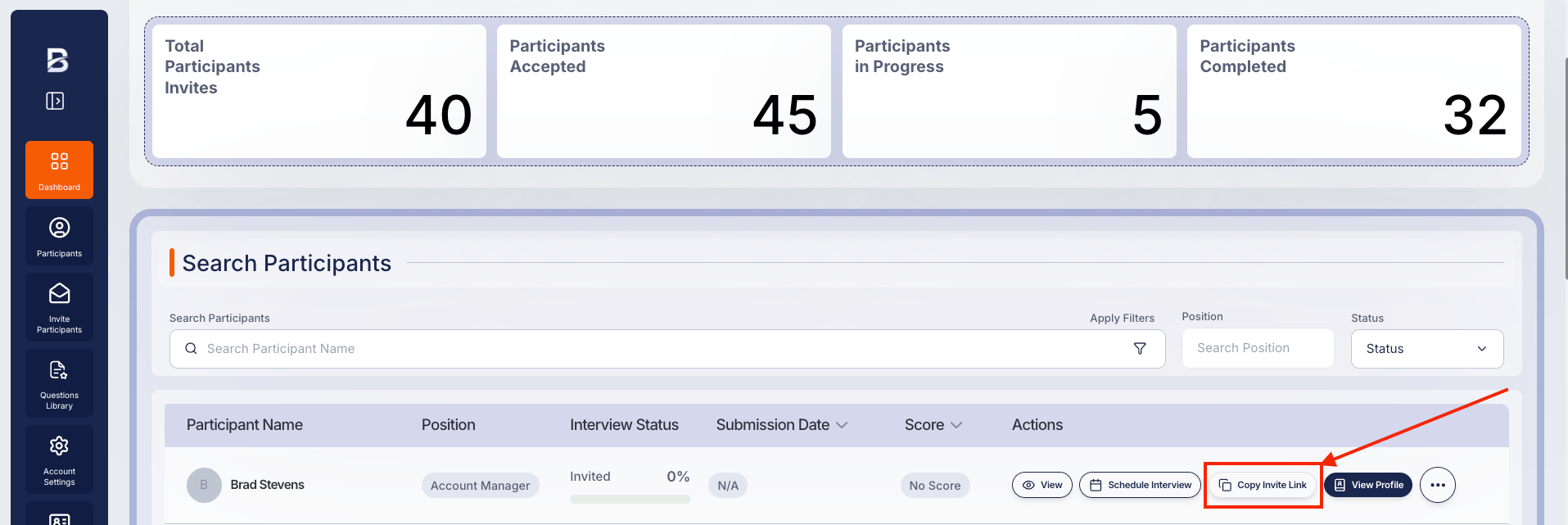
4
Candidates record their responses
Whoever receives the link sees a clean interview interface, reads the instructions, and records their video responses within the time limits you set. Bridge AI processes each submission automatically as soon as it is submitted.
Candidate recording a video response inside the Bridge Labs interview interface.
5
Review AI-scored results and share
Bridge AI scores each response, writes a summary, and breaks down performance across key signal areas: clarity, structure, tone, problem-solving, and communication. Review results in the dashboard or share them via a single link; no login is required for reviewers, hiring managers, coaches, or the candidates themselves.-(1).png?fit=max&auto=format&n=rXjFAtebaZEGLeaN&q=85&s=9b3c51ba44556b3a52c7a966d37b68b3)
-(1).png?fit=max&auto=format&n=rXjFAtebaZEGLeaN&q=85&s=50bc32496573ac799b4342a8d5790d16)
Results dashboard showing AI score, written summary, and signal breakdown for a completed interview.
Get up and running
Introduction
Learn what Bridge Labs is and how it serves both hiring teams and interview practitioners.
Quick Start
Set up your account and launch your first interview in minutes.
Core Features
Explore async video interviews, AI scoring, question library, and candidate profiles.
Pricing
Compare plans from Freemium to Enterprise and find the right fit.
Key Capabilities
- Asynchronous video interviews: Record on any device, any time. No scheduling friction, no no-shows.
- AI question generation: Generate high-quality interview questions from a job description, skill list, or topic in seconds using Bridge AI.
- AI candidate scoring: Every response is automatically scored using Bridge AI, with clear, explainable metrics tied to the criteria you define.
- Mock interview mode: Run structured practice sessions with the same AI scoring and feedback used in live hiring.
- Custom rubrics: Define what great looks like for each role or session. The AI evaluates against your criteria, not a generic baseline.
- Question library: Deploy pre-validated question sets instantly, or build fully custom assessments for any role or skill area.
- Interview summaries and reports: Auto-generated summaries give reviewers a clean overview without watching every second of video.
- Shareable candidate profiles: Share video and AI insights via a single link with no login required for reviewers.
- White-label branding: Present a branded experience to every candidate, reinforcing your employer, agency, coaching practice, or school identity.
- Unlimited team seats: Every plan includes unlimited seats so your whole team can collaborate without counting licenses.
Explore by use case
SMBs
Hire faster without a dedicated HR team.
Start-ups
Protect founder time and move at startup speed.
Enterprise
Standardize screening at massive scale.
Staffing Agencies
Win more placements with shareable video profiles.
BPOs
Fill high-volume seats faster without extra headcount.
Recruiters
Screen smarter and advance top candidates in less time.
Schools and Universities
Prepare every student for real interviews with structured AI feedback at cohort scale.
Career Coaches
Run mock sessions for more clients without adding hours to your schedule.
Job Seekers
Practice real interview questions, get AI feedback, and arrive confident.
Frequently asked questions
What is Bridge Labs?
What is Bridge Labs?
Bridge Labs is a complete interview platform that serves two use cases on the same product. Hiring teams use it to screen candidates with async video interviews and AI scoring. Job seekers, coaches, and schools use it to practice and prepare for interviews with structured feedback. Both audiences use the same features: async video, AI scoring, custom rubrics, and shareable results.
Who is Bridge Labs for?
Who is Bridge Labs for?
Bridge Labs is built for recruiters and hiring managers who need to screen efficiently, staffing agencies and companies that handle high-volume candidate pipelines, career coaches who run mock interview programs for clients, schools and universities that want to prepare students at scale, and job seekers who want to practice on their own with real AI feedback.
How does Bridge AI scoring work?
How does Bridge AI scoring work?
When a candidate or practitioner submits their video response, Bridge AI transcribes the answer and evaluates it against the Key Information tags and Criteria Checks you defined for each question. It produces a question-level score, an overall score, and a written summary highlighting strengths and gaps. See the AI Scoring guide for a full breakdown.
Can I use Bridge Labs for mock interview practice, not just hiring?
Can I use Bridge Labs for mock interview practice, not just hiring?
Yes. Mock interview practice is a first-class use case on Bridge Labs. Career coaches, schools, and individual job seekers use Bridge Labs to run structured practice sessions with the same AI scoring and feedback used in live hiring. There is no feature difference between a hiring interview and a practice session. The only difference is how you use the results.
Is there a free plan?
Is there a free plan?
Yes. Bridge Labs offers a Freemium plan with five interviews per month at no cost, no credit card required. See the Pricing page for a full comparison of plans.